
Secure and fast sign-in

As an administrator, you want users to sign in securely and reliably. Here is how our system approaches this.
Active sessions
Entering the correct login details takes you directly to the dashboard. Only one active session is allowed per account. You cannot sign in while already logged in on another device or tab. If you forget to sign out, wait fifteen minutes for the session to end automatically.
Forgotten your password?
Click “Forgot password” to receive a link giving access to your account. Once signed in, you can create a new password. The link expires after a set period and cannot then be reused. The one-session rule still applies: you cannot sign in while another session is active.
No email received?
- Check your junk or spam folder.
- Try again.
- Check that you entered the correct email address.
Still unable to sign in?
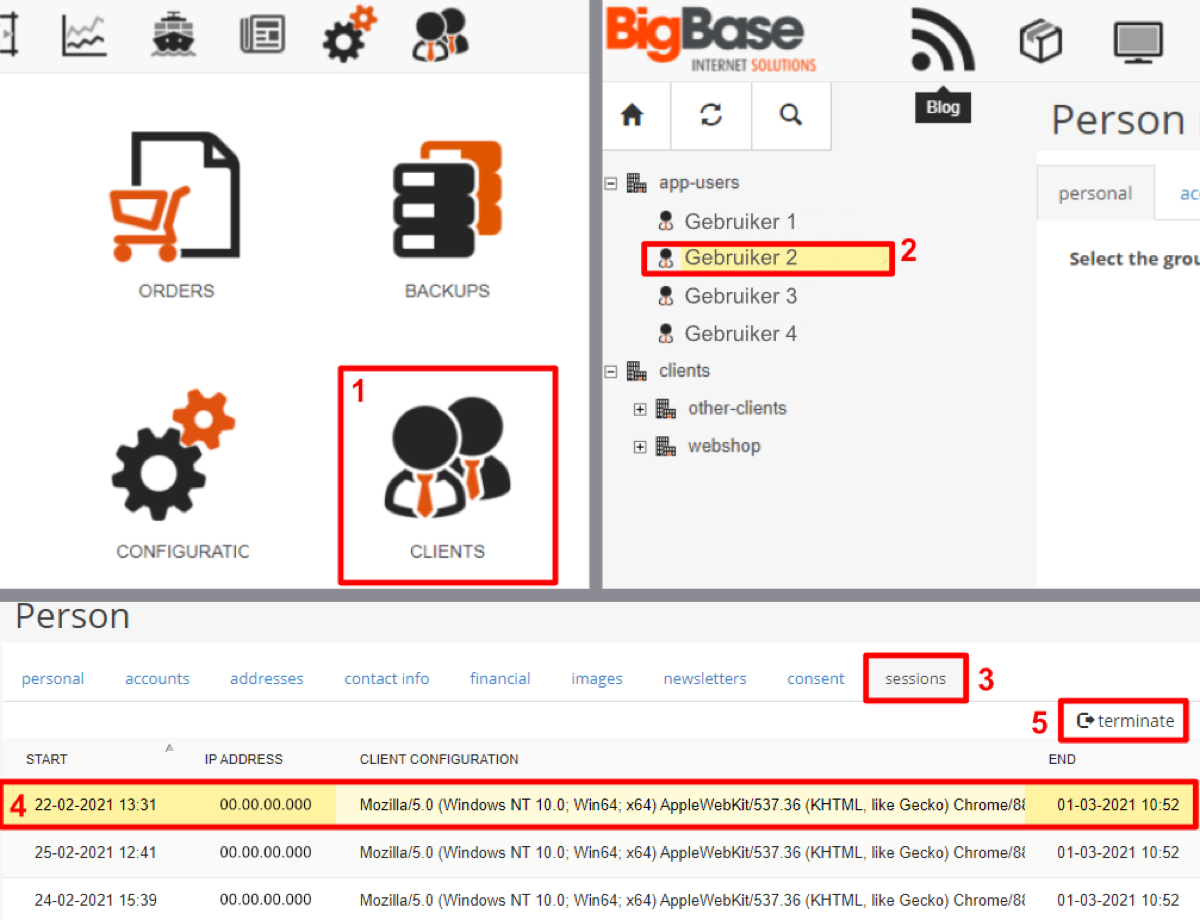
Administrators can manually terminate sessions and create, edit or remove users, controlling who can use the system. To end a session:
- Open “Users and customers / Clients”.
- Select the user.
- Open “Sessions”.
- Select the session to end.
- Click “Terminate”.
Finding the balance
Our goal is to balance security and convenience for a pleasant user experience.
If you still cannot sign in, contact us. If these settings are unavailable, we can update your system to add them.